A Trip Down Memory Lane: PythonBytes Shoutout to Fades

I wanted to share a little piece that still makes me smile. Back on July 6, 2017, the awesome folks over at the PythonBytes podcast (which, by the way, is hands down my favorite Python podcast—seriously, if you're not already tuning in, do it now) gave a shoutout to a Python library that I'm particularly fond of: Fades.

For those who might not know, Fades (which stands for FAst DEpendencies for Scripts) is a tool that automatically handles Python dependencies for your scripts, so you can just focus on writing code without worrying about the setup. It's a project I help maintain, and seeing it get highlighted on such a popular platform was a huge moment for me.

The episode in question is Episode 33: You Should Build an Alexa Skill, and it covers a ton of cool Python-related stuff. But the Fades mention? That was definitely the cherry on top for me.

If you're a Pythonista looking for a way to make your script development a bit smoother, I highly recommend giving Fades a try. And if you're into Python news and updates, go ahead and subscribe to PythonBytes—trust me, it's worth it.

fades8.1_released

We're glad to announce the release of fades 8.1.

fades is a system that automatically handles the virtualenvs in the cases normally found when writing scripts and simple programs, and even helps to administer big projects.

It will automagically create a new virtualenv (or reuse a previous created one), installing the necessary dependencies, and execute your script inside that virtualenv.

You only need to execute the script with fades (instead of Python) and also mark the required dependencies. More details here:

http://fades.rtfd.org/

What's new in this release?

  • Automatically execute scripts from the web, supporting most common pastebins

  • Multiple (and missing) requirement.txt file support, which can now be nested

  • Avoid checking package availability if no PyPI dependencies indicated

  • Add an option to show the virtualenv path in the system

  • Better error/help on missing indicated script or executable from dependency

  • Improved logs, PyPI urls, documentation, multiplatform support, and several other small fixes/enhancements

We want to say a big thank you to the following collaborators that helped to improve and enhance fades in different ways for this version (in alphabetical order):

To install and enjoy fades...

  • If you are in Ubuntu or Debian, you can easily install like this (but probably won't get latest fades:

    sudo apt-get install fades
  • For not latest debian/ubuntu you have a .deb here (with its Debian source file):

    http://ftp.debian.org/debian/pool/main/f/fades/fades_8.1-1_all.deb
    http://ftp.debian.org/debian/pool/main/f/fades/fades_8.1-1.dsc
  • Install it in Arch is very simple:

    yaourt -S fades
  • In any Linux if you have the Snap system:

    snap install fades
  • Using pip if you want:

    pip3 install fades
  • You can always get the multiplatform tarball and install it in the old fashion way:

    wget http://ftp.debian.org/debian/pool/main/f/fades/fades_8.1.orig.tar.gz
    tar -xf fades_*.tar.gz
    cd fades-*
    sudo ./setup.py install

Help / questions:

Thanks in advance for your time!

Postgres non-durable options Docker container.

Some weeks ago I was at Pycamp whit LeCoVi working on the Pyar website (check the link PyCamp is the best event ever!) and I showed him my configuration to speed-up django tests. Some days ago he asked me for the config. I think that it'is better to share it in my blog, so here I'm.

When you work with a framework like Django, to develop it with the same database that you run in production is a really good idea. It's really easy using docker-compose. And to speed up your tests you can configure postgres with its non-durable options.

Here my recipe to do it.

I'm using the oficial Postgres Docker image adding only some scripts:

FROM postgres:9.4.4
MAINTAINER gilgamezh <[email protected]>

COPY docker-entrypoint_db.sh /
COPY non_durable.sh /
ENTRYPOINT ["/docker-entrypoint_db.sh"]

Here the content of docker-entrypoint_db.sh. I'm using an environment variable to enable or disable the non_durable settings:

#!/bin/bash

if [ -v POSTGRES_NON_DURABLE_SETTINGS ]; then
    cp /non_durable.sh /docker-entrypoint-initdb.d/
fi

# run the default img entrypoint
/bin/sh /docker-entrypoint.sh postgres

And here the script to change the Postgres configuration:

#!/bin/bash

# setting non-durable options
# https://www.postgresql.org/docs/current/static/non-durability.html
echo "Configuring postgres non-durable options."
# no need to flush data to disk.
echo "fsync = off" >> /var/lib/postgresql/data/postgresql.conf
# no need to force WAL writes to disk on every commit.
echo "synchronous_commit = off" >> /var/lib/postgresql/data/postgresql.conf
# no need to guard against partial page writes.
echo "full_page_writes = off" >> /var/lib/postgresql/data/postgresql.conf

Then in my docker-compose.yml file I'm setting the POSTGRES_NON_DURABLE_SETTINGS variable:

environment:
  - POSTGRES_PASSWORD=xxxx
  - POSTGRES_NON_DURABLE_SETTINGS=1

With these changes my tests are running a lot faster. 🚀🚀🚀

Regalo estos libros

Hoy me puse a ordenar/tirar papeles. Esta vez le tocó a mis cosas de estudio. Tiré un montón de libros, tuve que darle rosca de lo lindo a la destructora de papel, me divertí con diagramas de diseño, apuntes y cosas viejas y tengo un montón de libros para regalar.

OJO leer bien, son casi todos impresos en laser o fotocopias

  • Managing and Maintaining a MS Windows server 2003 environment.

  • Administering a MS SQL Server 2000. (estos dos estoy pensando en tirarlos directamente)

  • Access 2000 (para IBM y compatibles). Carlos Boqué. (que feo!!)

  • Manual de administración de Windows 2000 server de Compumagazine.

Estos ya encontraron nuevo dueño: UPDATE: 17/2/2015

  • Dictadura del diseño. Notas para estudiantes molestos. Carlos Carpintero.

  • Thinking in java (fouth edition), Bruce Eckel. tomos 1 y 2 (enormes).

  • Python para todos. Raúl González Duque.

  • Object oriented Analysis and Desing with applications, third edition. Boch, jacobson, Rumbaugh.

  • Probabilidad y estadística aplicadas a la ingenieria. Douglas Montgomery.

  • Estructura y diseño de computadores. David A. Patterson, John L Hennessy.

  • Métodos orientados a objetos: consideraciones prácticas. James Marin, James J Odell.

  • Matemáticas Discretas, cuarta edición. Richard Johnsonbaugh.

Creo que los de MS van a ir a la basura como corresponde ;)

Estoy a punto de directamente tirarlos. Pero tal vez alguno sirve y tal vez hay algún que otro caso raro que quiere uno de esos. Por ejemplo los de MS serían unas excelentes patas de cama.

Todos excepto los de MS son fotocopias. Si te interesa alguno escribime a mail at gilgamezh.me.

ramen!

HowTo (stress)test a website with Apache Benchmark

Hoy por la mañana @reydelhumo queria probar un sitio que tiene en una raspy, yo le recomendé que use ab para hacer algunas pruebas básicas de load.

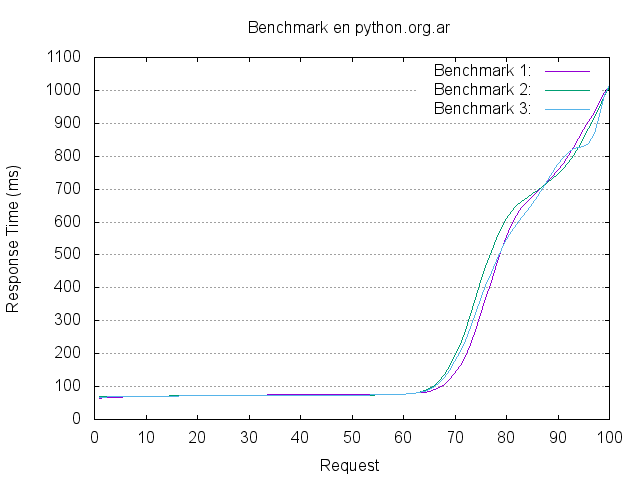
Usar ab es muy simple, pero es mucho más lindo poder hacer gráficos de los resultados, así que aproveché el momento para armar este post.

El objetivo es poder hacer varios tests contra una URL usando diferentes valores de concurrencia/cantidad de requests y gráficar la salida.

Primero hay que ejecutar las pruebas con ab:

ab -c 3 -n 100 -v 2 -g out1.tsv -H "Accept-Encoding: gzip,deflate"  http://python.org.ar/

Esa configuración significa:

  • -c 3: concurrencia 3

  • -n 15: 15 request

  • -v 2: verbose (muestra los headers)

  • -g out1.tsv: salida para gnuplot

  • -H -H "Accept-Encoding: gzip,deflate" Hacer requests con gzip (igual que cualquier browser)

La idea es repetir N veces la prueba con los mismos parametros renombrando outN.tsv.

Yo ejecuté tres pruebas:

/tmp  ll out*.tsv
-rw-r--r-- 1 gilgamezh users 4934 Oct 31 11:26 out1.tsv
-rw-r--r-- 1 gilgamezh users 4930 Oct 31 11:26 out2.tsv
-rw-r--r-- 1 gilgamezh users 4936 Oct 31 11:27 out3.tsv

Cada una nos da una resumen con una salida, pero mucho mejor ver un gráfico. Con gnuplot es muy simple.

Yo uso un template que edito cada vez:

# output as png image
set terminal png

# save file to "benchmark.png"
set output "benchmark_python.org.ar.png"

# graph title
set title "Benchmark en python.org.ar"

# aspect ratio for image size
set size 1,1

# enable grid on y-axis
set grid y

# x-axis label
set xlabel "Request"

# y-axis label
set ylabel "Response Time (ms)"

# plot data from bench1.tsv,bench2.tsv and bench3.tsv using column 10 with smooth sbezier lines
plot "out1.tsv" using 10 smooth sbezier with lines title "Benchmark 1:", \
     "out2.tsv" using 10 smooth sbezier with lines title "Benchmark 2:", \
     "out3.tsv" using 10 smooth sbezier with lines title "Benchmark 3:"

Es un poco precario porque hay que editarlo a mano con el nombre de los .tsv. Algún día me voy a tomar el tiempo de automatizar todo. ;)

lo guardo como gnuplot.template y ejecuto:

gnuplot gnuplot.template

Y listo! tenemos nuestro gráfico. (sí hay que tener gnuplot instalado. en Arch el paquete se llama python-gnuplot)

/images/benchmark_python.org.ar.png

Por ejemplo la conclusión de esta prueba es que python.org.ar necesita un caché de frontend :)

Cómo usar un tunel SSH como proxy para HTTP

Es muy común estar en un lugar donde tenemos problemas o limitaciones para navegar por internet y que necesitemos una alternativa. Sea por un proxy que bloquea cosas, un DNS que resuelve mal o porque no queremos ser espiados.

La manera más simple es hacer un tunel SSH contra un equipo al que nos podamos conectar y usarlo como puente (proxy) para salir a Internet.

Hay 2 maneras de usar un tunel SSH la más conocida es un tunel para un único puerto.

Por ejemplo. Estoy en mi notebook llamada trator.local y quiero llegar al puerto 1982 de la maquina terminus.midominio.com. Pero no puedo porque ese puerto está cerrado en mi red.

Pero sí puedo llegar al puerto 22 (SSH) de la maquina puente.midominio.com. Entonces puedo hacer un tunel contra puente.midominio.com redireccionando el puerto 1982 de mi maquina al 1982 de terminus.midominio.com utilizando puente.midominio.com como tunel.

1982[trantor]---SSH(((internet)))--->[puente]---(((INTERNET)))--1982--->[terminus]

Para esto hay que ejecutar::

ssh -L 1982:terminus.midominio.com:1982 [email protected]

Luego puedo conectarme al puerto 1982 de mi maquina (127.0.0.1:1982) y voy a estar accediendo a terminus.

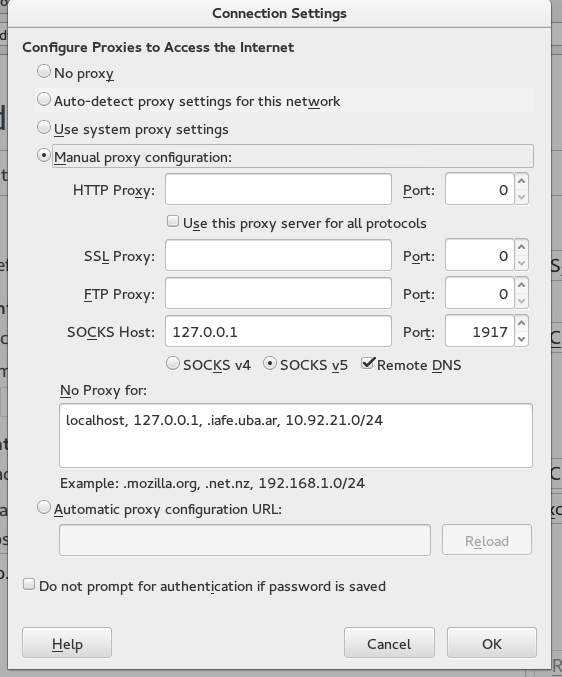
Ahora bien, usar esta manera para navegar por internet es muy molesto, ya que sería imposible estar haciendo un tunel para cada equipo al que quiero llegar. Para poder sacar todo el tráfico de mi browser por tunel.midominio.com puedo crear un tunel 'especial' que usa el protocolo SOCKS, y luego configurar mi firefox para que lo utilice.

Primero se genera el tunel:

ssh -N -D 1917 [email protected]

Luego en firefox se configura de la siguiente manera.

/images/firefox_proxy.png

Con eso ya podemos navegar con nuestro proxy. Una buena manera de validar es ingresar a http://ifconfig.me y validar la IP por la que estamos llegando.

Incognitosis y la PEP8

Hace un tiempo trabajando con fades Facu me propuso "estirar" el "Maximum Line Length" para probar si resultaba un poco más cómodo. A mi me pareció perfecto ya que entiendo que deben quedar muy pocas terminales de 80 columnas. Eso sí antes de dar un paso adelante confirmamos con la PEP8 que se puede llevar hasta 100 caracteres, sin romper esta santa ¿ley?.

Some teams strongly prefer a longer line length. For code maintained exclusively or primarily by a team that can reach agreement on this issue, it is okay to increase the nominal line length from 80 to 100 characters (effectively increasing the maximum length to 99 characters), provided that comments and docstrings are still wrapped at 72 characters.

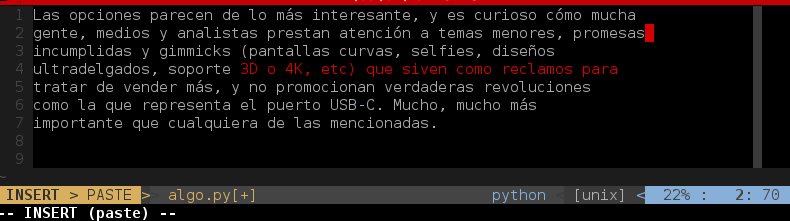
Así que ahí fuimos. Como yo tengo una linea que me marca ese límite esto fue lo que cambié en mi .vimrc

function! ConditionalLoad()
highlight ColorColumn guibg=PaleTurquoise1
if getcwd() =~ $HOME . "/code/fades/*"
    set colorcolumn=99
else
    set colorcolumn=80
endif
endfunction
autocmd BufRead *.py call ConditionalLoad()
autocmd BufRead *.rst call ConditionalLoad()

El código de esa función es de Facundo.

El punto del cual tomé especial nota es que para los comentarios y docstrings la PEP8 recomienda mantenerse dentro de los 72 caracteres

that comments and docstrings are still wrapped at 72 characters.

Hoy hice click en mi RSS sobre una nota de Incognitosis (a quién normalmente leo por RSS) y me llamó la atención el hermoso diseño del blog. Así que dejé un comentario. Apenas termine de escribir el comentario me acordé de los 72 chars y fui a comprobarlo

/images/javipass_pep8.png

Efectivamente la causa de que el blog de Javi Pastor sea tan cómodo para la lectura es su respeto por la PEP8!!

Ya que estamos les recomiendo que no dejen de prestarle un ojo a Incognitosis, es una de los pocos blogs que llevo años leyendo.

Día internacional de la Mujer Trabajadora

El 8 de marzo se festeja justamente lo que dice el titulo de este post. no es el día de las Legrand, las thatcher, las Alfano, etc. Es un buen momento también para recordar que no es únicamente una cuestión de género.

Feliz día!

Si Dios fuera una mujer

¿Y si Dios fuera mujer?
pregunta Juan sin inmutarse,
vaya, vaya si Dios fuera mujer
es posible que agnósticos y ateos
no dijéramos no con la cabeza
y dijéramos sí con las entrañas.

Tal vez nos acercáramos a su divina desnudez
para besar sus pies no de bronce,
su pubis no de piedra,
sus pechos no de mármol,
sus labios no de yeso.

Si Dios fuera mujer la abrazaríamos
para arrancarla de su lontananza
y no habría que jurar
hasta que la muerte nos separe
ya que sería inmortal por antonomasia
y en vez de transmitirnos SIDA o pánico
nos contagiaría su inmortalidad.

Si Dios fuera mujer no se instalaría
lejana en el reino de los cielos,
sino que nos aguardaría en el zaguán del infierno,
con sus brazos no cerrados,
su rosa no de plástico
y su amor no de ángeles.

Ay Dios mío, Dios mío
si hasta siempre y desde siempre
fueras una mujer
qué lindo escándalo sería,
qué venturosa, espléndida, imposible,
prodigiosa blasfemia.